Transform text anywhere.
One keystroke.
Select any text in Chrome, press Ctrl Shift Space, and rewrite, summarize, translate, or explain it — private by default, on-device.
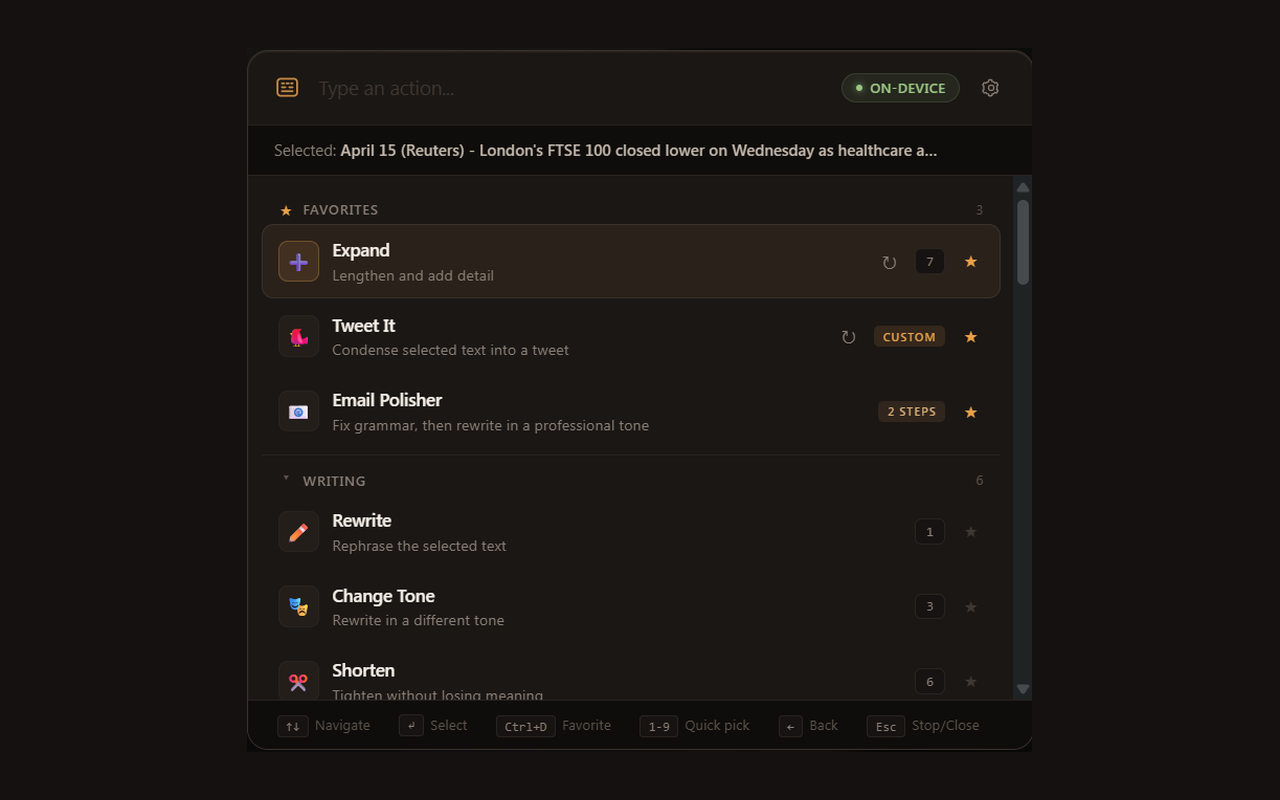
Select text
Highlight any text on any website — from email threads to code reviews.
Press shortcut
Hit Ctrl Shift Space to open the command palette instantly.
Transform
Choose an action or fuzzy-search. Watch as AI processes and replaces text inline.
Built for speed.
Keyboard palette
Search actions, navigate with arrows, and execute with Enter. Designed for muscle memory.
Fuzzy search
Instantly filter through dozens of custom and built-in actions with minimal keystrokes.
Inline replace + Undo
Replace text directly in textareas. Press Ctrl+Z to revert if it isn't perfect.
Favorites + Quick Pick
Pin common tasks. Use 1-9 keys to trigger your favorites without searching.
On-device by default
Processes text using Gemini Nano in your browser. Sensitive data never leaves your machine.
Site profiles (Pro)
Configure actions that only appear on specific domains like GitHub, Gmail, or Slack.
Private by design.
ClipAction's default mode processes text entirely on your device using Chrome's built-in Gemini Nano model. Your selected text never leaves your machine. There are no analytics, no telemetry, and no tracking pixels.
When you choose to connect a cloud AI provider, the red "Cloud" badge clearly indicates when data is being sent externally. We never proxy or store your data.
Verify it yourself in Chrome DevTools.
Choose your speed.
Starter
-
7 core AI actions -
Local Gemini Nano processing -
Command palette access -
Keyboard shortcuts
Professional
Most Popular-
All 20+ built-in actions -
BYO API keys (GPT-4, Claude 3) -
Prompt chaining workflows -
Site-specific profiles -
Custom actions builder